Best Free Google Ads Audit Tools (2026): Compared Side by Side
A free Google Ads grader gives you a score in about a minute. A free Google Ads audit tool like Ads Audit by Maitreya Labs builds a report from your actual sales and covers Meta alongside Google. Every tool on this page has a free way in. The right one depends on the question you are trying to answer today.
On this page
- Seven Free Google Ads Audit Tools Compared
- Which Free Google Ads Audit Tool to Pick
- Three Kinds of Free Google Ads Audit: Score Card, Sales Report, and Fix Tool
- What Access Each Tool Asks For, and Why Read-Only Matters
- Each Tool in Detail
- What a Free Score Cannot Tell You
- When Ads Audit Is the Wrong Choice
- How We Compared These Tools
- Common Questions About Free Google Ads Audit Tools
Seven Free Google Ads Audit Tools Compared
The table below covers seven tools — four connectors with a free tier, one built into Google Ads, and two paid tools with a free trial. The columns show price, the access each tool asks for, what comes back, and the main limit.
| Tool | Price | Access it asks for | What you get back | Main limit |
|---|---|---|---|---|
| Ads Audit (Maitreya Labs) | Free | Read-only service account; label you add | 5-page ROAS report and 3-month forecast | Google Ads required; setup takes about 10 minutes |
| WordStream Google Ads Grader | Free | One-time read-only Google Ads credentials | Account score, area scores, benchmark tips | Google Ads only |
| Adzooma Performance Audit | Free | Google Ads link; read-only scope not stated | Performance Score out of 100, recommendations | Refreshes monthly on the free plan |
| AdTool by myWebhero | Free | Read-only Google sign-in | Score out of 100, letter grade, 7 areas | Search, Shopping, Performance Max only |
| adz.so | Free | Google sign-in; scope not stated | Findings with evidence and a recommended fix | Last 30 days only |
| Google Ads optimization score | Free (built in) | No new access | Account score 0–100%, recommendations | Active campaigns in supported types only |
| Optmyzr and Adalysis trials | Free trial | Google Ads account | Audits, budget monitoring, rule engine | From $126 or $209 a month, billed annually |
Prices and access checked on 19 November 2026 on each vendor's own site: maitreyalabs.com, wordstream.com, adzooma.com, app.mywebhero.co.uk, adz.so, Google Ads Help, optmyzr.com, adalysis.com.
Which Free Google Ads Audit Tool to Pick
The question you are trying to answer is the fastest way to choose. Each line names a question and the tool that fits.
- Pick WordStream Google Ads Grader if you want a quick score with benchmark data in about a minute.
- Pick Adzooma Performance Audit if you want a score that refreshes each month on its own.
- Pick adz.so if you want to review and apply one-click fixes from inside the audit report.
- Pick Google Ads optimization score if you want a check with no new access or third-party sign-in.
- Pick Ads Audit by Maitreya Labs if you want a report built on your sales, a stop list for week 1, and a month-by-month Meta and Google budget split.
- Pick Optmyzr or Adalysis if you want ongoing automation and account management, and are ready to move to a paid plan.
Three Kinds of Free Google Ads Audit: Score Card, Sales Report, and Fix Tool
Free Google Ads audit tools fall into three groups. The group you pick shapes what you learn and what you do next.
Score cards — a free Google Ads grader like WordStream, Adzooma, AdTool by myWebhero, and the built-in Google Ads optimization score — compare your account to benchmarks and return a number. They answer: how does this account compare to similar ones? They cover patterns across keywords, Quality Score, and click-through rate. A score card grades the account's settings against benchmarks; it does not read store sales outside the ad account or plan a budget split with Meta.
Sales reports — Ads Audit by Maitreya Labs — pull spend and conversion data, run fixed rules against your numbers, and return findings tied to actual revenue. They answer: what do the numbers say about sales, and where does the budget go next month?
Fix tools — adz.so, and paid options like Optmyzr and Adalysis — show a finding and let you apply a change from inside the tool. They answer: what should change, and can I make that change right now?
What Access Each Tool Asks For, and Why Read-Only Matters
Read-only access lets a tool read your data. It cannot edit, pause, or create ads, change bids, or touch billing. The access scope matters before you connect any account.
Ads Audit by Maitreya Labs: You add a service account as read-only in Google Ads (Admin > Access and security > Add) and add a label with a code the tool shows only to you. The access reads campaigns, spend, results, and conversions. It cannot edit ads, pause campaigns, spend money, or change billing. You remove it at any time from the same screen.
WordStream Google Ads Grader: You sign in with Google Ads credentials and grant one-time read-only access.
Adzooma Performance Audit: You link your Google Ads account to a free Adzooma account. The page does not say whether the access is read-only.
AdTool by myWebhero: Google sign-in with read-only access.
adz.so: Google sign-in. The page does not state the access scope. Supported fixes can be applied from the audit itself after you review each proposed change.
Google Ads optimization score: Built into Google Ads. No third-party connection needed.
Optmyzr and Adalysis: You connect your Google Ads account. Optmyzr includes account audits, reports, budget monitoring, and a rule engine. Adalysis covers unlimited Google Ads and Microsoft Ads accounts.
Before you connect any free audit tool: 7 checks

1. Is the access read-only or does it include write access?
   Ads Audit: read-only. The service account reads campaigns,
   spend, results, and conversions. It cannot edit, pause,
   or create ads, and it cannot change billing.

2. Can the tool change bids, pause ads, or create campaigns?
   Ads Audit: no. Read-only access cannot make any change
   to your account.

3. Who sees your account data?
   Ads Audit: each audit sits in its own folder. A person
   reads the report only if it fails the checks.

4. How long is your data kept?
   Ads Audit: each audit is deleted after 30 days.

5. Which platforms does it cover?
   Ads Audit: Google Ads (required) and Meta (optional, via
   four CSV exports). A Meta-only audit cannot start.

6. What do you get back?
   Ads Audit: a 5-page ROAS report and a 3-month forecast.

7. How do you remove the access when you are done?
   Ads Audit: in Google Ads, Admin > Access and security,
   remove the service account. You can do this at any time.
Each Tool in Detail
The entries below cover price, access, what you get back, the main limit, and what each tool is best for.
Ads Audit by Maitreya Labs
Ads Audit is free. You add a service account as read-only and add a label with a code shown only to you; setup takes about 10 minutes of your time. It returns a 5-page ROAS report and a 3-month forecast covering Google Ads and, optionally, Meta via four CSV exports from Ads Manager. Best for: a report built on your sales with a stop list for week 1 and a month-by-month budget split across both platforms.
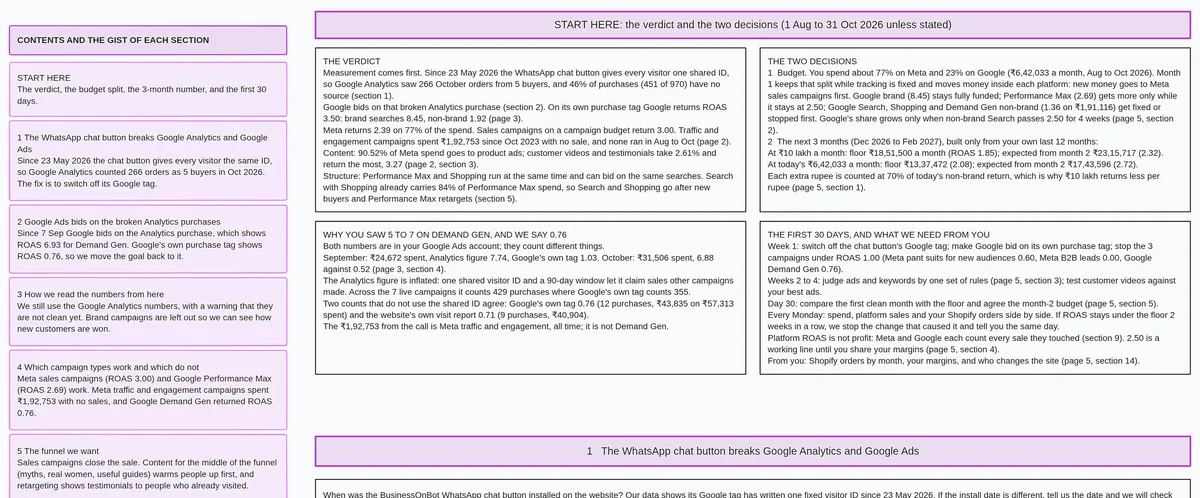
free Google Ads audit with a read-only 5-page report
WordStream Google Ads Grader
WordStream Google Ads Grader is free; you sign in with Google Ads credentials and grant one-time read-only access. It returns an account score, scores by area, and benchmark comparisons — including wasted spend, Quality Score, and click-through rate. It covers Google Ads only. Best for: a quick benchmark score in about a minute.
WordStream Google Ads Grader compared with the alternatives
Adzooma Performance Audit
Adzooma Performance Audit is free, with no credit card required. You link your Google Ads account to a free Adzooma account; the page does not say whether the access is read-only. It returns a Performance Score out of 100 with strengths, weaknesses, and recommendations across Search, Shopping, Display, Performance Max, Video, App, and Travel campaigns; the free plan refreshes the score monthly. Best for: a score that updates on its own each month.
AdTool by myWebhero
AdTool by myWebhero is free, with no credit card required. Google sign-in gives it read-only access. It returns a score out of 100 with a letter grade, scores across seven areas, AI-written recommendations, and a shareable report. It covers Search, Shopping, and Performance Max campaigns. Best for: a quick score with a letter grade and shareable report.
adz.so
adz.so offers a free audit of the last 30 days with no credit card required. You sign in with Google; the page does not state the access scope. It returns findings on location targeting, purchase conversions, and other areas, each with evidence and a recommended value; supported fixes can be applied from inside the audit after you review each change. Best for: reviewing and applying specific fixes one at a time.
Google Ads optimization score
The Google Ads optimization score is built into Google Ads at no extra charge. No new access or third-party connection is needed. It gives a score from 0 to 100% with recommendations for active Search, Display, Video Action, App, Performance Max, Demand Gen, and Shopping campaigns. Best for: a quick check with no sign-in to any new tool.
Optmyzr and Adalysis trials
Optmyzr is a paid tool with a free trial and no credit card required. It covers account audits, budget monitoring, reports, and a rule engine; paid plans start from $209 a month billed annually at the lowest spend band. Adalysis offers a 30-day free trial and covers unlimited Google Ads and Microsoft Ads accounts; paid plans start from $126 a month billed annually. Best for: teams ready to move to paid automation after the trial.
What a Free Score Cannot Tell You
A score compares your account settings to benchmarks and answers how the account looks by industry standards. The four things a score leaves out:
- Sales behind the ads — which campaigns and ad sets are driving actual purchases, including ads that spent more than twice the average cost per sale with no sales
- Which Meta purchase values to trust — campaigns whose reported purchase value sits far above the brand's normal order value need a closer look before any campaign optimises for value
- What to stop in week 1 — anything below 1.00 ROAS across the last 3 months
- The Meta and Google budget split — where each dollar goes next month, based on past sales by platform
If you want to check these by hand, the Google Ads audit checklist covers each one.
When Ads Audit Is the Wrong Choice
Ads Audit fits brands running Google Ads. For some situations, a different tool is the better fit.
- If you have no Google Ads account, the audit cannot start. Google Ads access is required.
- If you want a score in about a minute, WordStream Google Ads Grader, AdTool by myWebhero, or Adzooma return one faster.
- If you want fixes applied for you, or ongoing automation, Optmyzr and Adalysis are built for that.
- If you run Microsoft Ads, Adalysis covers those accounts. Ads Audit does not cover Microsoft Ads.
- If you want a check with no access granted to any new tool, the Google Ads optimization score is built into your account.
- If you run Meta ads but have no Google Ads account, the audit cannot start. See Meta ads audit from your Ads Manager exports for what the Meta exports cover.
How We Compared These Tools
We read each vendor's own public pages on 19 November 2026 and applied the same columns to every tool. Sources: wordstream.com (grader page, free tools page, and audit page), adzooma.com, app.mywebhero.co.uk, adz.so, Google Ads Help, optmyzr.com pricing page, and adalysis.com pricing page.
We did not run these tools side by side with our audit. Each one requires a sign-in to a live Google Ads account, and we had no account we could connect to all of them on the day. Everything about the other tools comes from their own public pages, read on 19 November 2026.
Two names from today's top five results are left out of this comparison. Gromerce's page did not load for us on 19 November 2026. PaidSync publishes a list that ranks its own tool first.
We make Ads Audit.
Common Questions About Free Google Ads Audit Tools
Free Google Ads audit tools raise a few practical questions before you connect. The answers below go by what each vendor's own page states.
Are free Google Ads audit tools really free?
Yes — WordStream Google Ads Grader and Ads Audit by Maitreya Labs are fully free. Adzooma, AdTool by myWebhero, and adz.so are also free, each with no credit card required. Optmyzr and Adalysis are paid tools; both offer free trials.
Is it safe to connect my Google Ads account?
Read-only access lets a tool read your data and cannot make changes to your account. WordStream and AdTool state read-only access clearly on their pages. Adzooma and adz.so do not state their access scope; use the checklist in the access section above before connecting to either. Ads Audit adds a label step that lets the audit verify your account before it runs.
Which free tool covers Meta ads too?
Ads Audit by Maitreya Labs covers Meta alongside Google Ads. You export four CSV files from Meta Ads Manager and upload them; no partner access is needed. The Meta exports make the 3-month forecast possible and add Meta ROAS, audience breakdowns, and landing page data to the report.
How often should I run a free audit?
Run a score-card grader when something changes — a new campaign, a budget shift, or a drop in results. Run a sales-based audit like Ads Audit when you want to review a full quarter and plan the next one.
Does a higher score mean more sales?
A score measures how well your account follows best-practice settings. A well-structured account with a high score can still produce poor sales if the product, the audience, or the offer needs work. A score is one input; your sales data is another.
Run Ads Audit to get a 5-page report on your ROAS, your stop list for week 1, and your Meta and Google budget split for the next three months. It is free, and your data is deleted after 30 days.