Meta Ads Audit: Free Report from Your Ads Manager Exports
A Meta ads audit should tell you which purchase values to trust, which ads spend without sales, and how Meta performs against Google each month. Ads Audit runs those checks free, from four CSV exports from Ads Manager and a read-only Google Ads connection. That is the Facebook ads audit this page covers.
On this page
What This Meta Ads Audit Checks
The audit reads Ads Manager exports and your Google Ads account. Page 1 shows the ROAS and sales to expect, the budget split, ads spending without a sale, purchase values to flag, and the week-1 stop list. Page 2 shows Meta ROAS by month, gender, audience types, and landing pages.
- Purchase values to flag: campaigns whose reported purchase value per order sits far above your normal order value. The audit counts those sales as zero, so every Meta ROAS in the report stays on the safe side.
- Ads running without sales: any ad that spent more than two times your average cost per sale with no sale recorded, plus how many still run and how many had add-to-carts.
- The day-7 rule: decide on each ad by day 7, or when it reaches two times your average cost per sale.
- Meta ROAS by month: how Meta performed across the full date range, month by month.
- Who buys by gender: share of spend and share of sales for each gender.
- Audience types: spend, share of spend, ROAS, and number of ad sets for each audience type.
- The page each ad opens: spend, share of spend, ROAS, and number of ads for each landing page.
- Week-1 stop list: every campaign below 1.00 ROAS across the last three months.
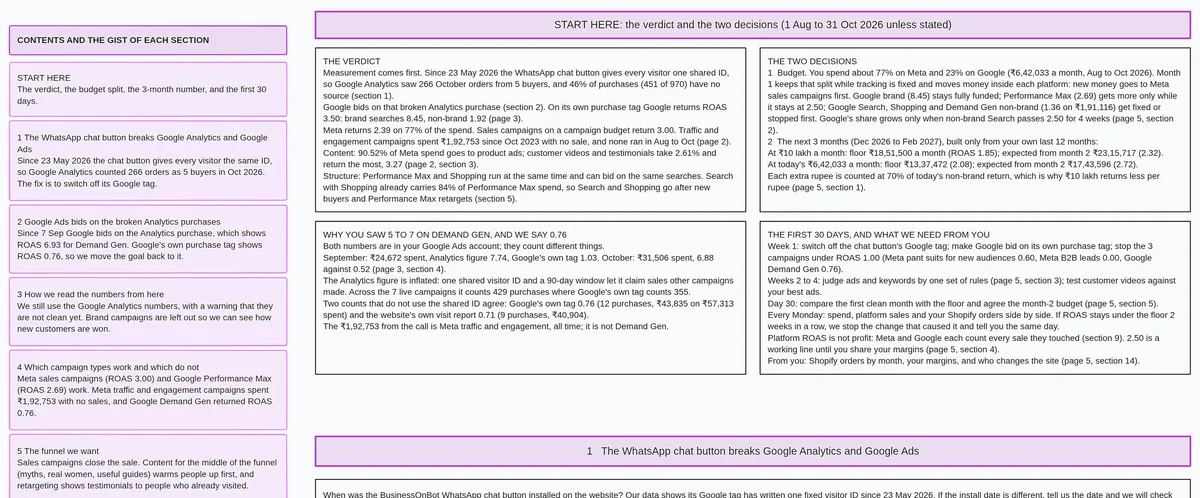
Ads Audit by Maitreya Labs is a free Meta and Google ads audit that reads your ad accounts and delivers a 5-page ROAS report and 3-month forecast, for brands running Meta and Google ads.
How Your Meta Data Reaches the Audit
Meta does not let outside services read partner accounts automatically. You export four CSV files from Ads Manager and upload them. Your Meta login stays with you.
Export steps:
- In Ads Manager, go to Reports > Export table data > CSV.
- Set the date range to Maximum.
- Select these seven columns: Amount spent, Impressions, Link clicks, Adds to cart, Purchases, Purchases conversion value, Attribution setting.
- Run the first export: Campaigns broken down by month.
- Run the second export: Campaigns broken down by age and gender.
- Run the third export: Ads with Ad ID (lifetime).
- Run the fourth export: Ad sets with Ad set ID (lifetime).
- Upload all four files in step 3 of the audit form.
You can skip the Meta uploads. The audit then covers your Google Ads account alone.
Meta export settings

Menu path:  Ads Manager > Reports > Export table data > CSV
Date range: Maximum

Columns to include:
  Amount spent
  Impressions
  Link clicks
  Adds to cart
  Purchases
  Purchases conversion value
  Attribution setting

Four exports to run:
  1. Campaigns  — broken down by month
  2. Campaigns  — broken down by age and gender
  3. Ads        — with Ad ID (lifetime)
  4. Ad sets    — with Ad set ID (lifetime)
Meta Ads Audit Checklist
This checklist covers the key questions to answer in Ads Manager on your own. Each item points to data in your own account.
- Find campaigns where the reported purchase value per order sits far above your typical order value and flag each one.
- List every ad that spent more than two times your average cost per sale with zero purchases recorded.
- For those ads, check whether any add-to-carts happened and record how many still run.
- Apply the day-7 rule: check each live ad and confirm you have made a stop-or-keep decision by day 7 or at two times your cost per sale.
- Pull ROAS by month for the last three months on every campaign.
- Mark every campaign below 1.00 ROAS across the full three-month window for the week-1 stop list.
- Check the attribution setting on each of your four exports and confirm it matches across all four files.
- Compare gender share of spend against gender share of sales and look for a wide gap.
- Break out ROAS by audience type and find audience types with high spend and low ROAS.
- Check the ROAS of the landing page each ad opens and find pages with high spend and low ROAS.
Why the Report Puts Meta Beside Google
A budget split between Meta and Google requires data from both platforms. The five-page report places both side by side, month by month. Every figure names its platform and its date range.
The 3-month forecast on page 5 uses data from both platforms. Uploading the four Meta exports makes the full forecast possible. The audit covers Google alone if you skip the Meta uploads.
Page 1 shows the recommended budget split. Page 5 shows the ROAS and sales expected over the next three months.
How Ads Audit Compares With Other Meta Audit Options
Each option answers a different question. The table shows what each one needs and what it returns.
| Option | Price | What it needs from you | What you get back | Main limit |
|---|---|---|---|---|
| Ads Audit (Maitreya Labs) | Free | Google Ads read-only access; 4 Meta CSV exports | 5-page ROAS report, budget split, 3-month forecast | Google Ads account required to start |
| WordStream Facebook Ads Grader | Free | Facebook Ads account login | Personalized score; audience and placement breakdown | Does not include a Google budget split |
| Madgicx | From $32/month (billed annually) | Meta ad account login | Automation, targeting, analytics, ad management | Paid; priced by monthly ad spend |
| Meta Ads Manager opportunity score | Free (part of Ads Manager) | Your Meta ad account | Opportunity score (0 to 100), in-platform recommendations | Meta campaigns only; does not read Google |
Prices checked on 19 November 2026 on each vendor's own site: wordstream.com, madgicx.com, Meta Business Help Center.
For readers who also run Google Ads, see how the WordStream Google Ads Grader compares.
When to Pick Another Tool
The right tool depends on what you need. Here are the cases where a different option fits better.
- No Google Ads account: Ads Audit requires a Google Ads account to start. The audit cannot begin without one.
- Daily automation and ad management: Madgicx offers automation, targeting tools, and ongoing ad management. Ads Audit delivers a one-time report.
- A quick score inside Meta: Meta Ads Manager shows an opportunity score and recommendations inside your existing account. It runs in Ads Manager and uses your live account data.
- A grade from a Facebook login alone: WordStream Facebook Ads Grader connects to your Meta account directly and returns a score from that login.
If you want real Shopify orders on every Meta row every day, see real Shopify orders inside Meta Ads Manager.
If the audit shows ads that need new words, write new Meta ad copy from your facts.
How We Compared
We read each vendor's public pages on 19 November 2026. Each tool's own site is the source for all vendor claims.
Sources:
- wordstream.com, the Facebook Ads Grader page
- madgicx.com pricing
- Meta Business Help Center, "About Meta Ads Manager"
The WordStream Facebook Ads Grader and Madgicx both require a sign-in to a real Meta ad account. We lacked a test account to connect on that day. Everything about those tools comes from their own public pages, read on 19 November 2026.
We make Ads Audit. That is a direct interest in this comparison.
Common Questions About This Meta Ads Audit
Here are answers to questions about the Meta ads audit.
Which Meta exports do I need?
You need four CSV files from Ads Manager: Campaigns broken down by month, Campaigns broken down by age and gender, Ads with Ad ID (lifetime), and Ad sets with Ad set ID (lifetime). The export settings section above lists the exact menu path, date range, and all seven columns.
Can I audit only my Meta ads?
Google Ads is required to start the audit. The audit cannot run on Meta data alone. The audit covers your Google Ads account if you skip the Meta uploads. Uploading the Meta exports adds the full forecast and the Meta sections of the report.
Is the Meta ads audit free?
Yes. Ads Audit has one plan and it is free.
What happens to my files?
Each audit sits in its own folder and is deleted after 30 days.
Does the audit change anything in my ad accounts?
The read-only Google Ads access can read campaigns, spend, results, and conversions. It cannot edit, pause, or create ads, spend money, or change billing. The Meta audit runs on your CSV exports only. You can remove the read-only Google Ads access at any time from the same place you added it.
Start the audit by entering your brand name and Google Ads customer ID on the form. All four steps take about ten minutes of your time.