WordStream Google Ads Grader vs Ads Audit: Which Fits Your Question?
The WordStream Google Ads Grader scores your Google Ads account in about a minute and shows how it compares with similar accounts. It is free. Ads Audit is a free Google Ads audit that returns a 5-page ROAS report and a 3-month forecast. Both tools are free. The right one depends on the question you are answering today.
On this page
- How the Tools Compare
- Which Tool to Pick
- What the WordStream Google Ads Grader Scores
- What Ads Audit Covers
- Google Ads Optimization Score
- The Paid Tools: Optmyzr and Adalysis
- What a Grade Cannot Tell You
- When the WordStream Grader Is the Right Pick
- How We Compared
- Questions About the WordStream Google Ads Grader
How the Tools Compare
The comparison below covers the WordStream Google Ads Grader and four other ways to check a Google Ads account. The table below puts their price, setup, output, and main limit side by side. Data comes from each vendor's own public pages, read on 19 November 2026.
| Tool | Price | What it needs from you | What you get back | Main limit |
|---|---|---|---|---|
| WordStream Google Ads Grader | Free | Google Ads sign-in; one-time read-only access | Score, area grades, benchmark comparison | Google Ads accounts only |
| Ads Audit (Maitreya Labs) | Free | Read-only access, label step, optional Meta CSV exports | 5-page ROAS report and 3-month forecast | Google Ads required to start |
| Google Ads optimization score | Free | Active Google Ads account | Score 0–100% with recommendations | Active campaigns only |
| Optmyzr | From $299/mo monthly, $209/mo annual | Paid subscription | PPC management, audits, reports, budget monitoring, rule engine | Paid; lowest band up to $25K/mo spend |
| Adalysis | From $149/mo monthly, $126/mo annual | Paid subscription | PPC software; unlimited Google Ads and Microsoft Ads accounts | Paid; lowest band up to $50K/mo spend |
Prices checked on 19 November 2026 on each vendor's own site: WordStream, Google, Optmyzr, Adalysis.
Which Tool to Pick
Your best pick depends on the question you are trying to answer. A fast score with peer benchmarks points to the WordStream grader. A ROAS audit with a budget split and forecast points to Ads Audit. Ongoing automated management points to a paid platform.
- Pick the WordStream grader if you want an account score and benchmark comparison in about a minute, with no manual export.
- Pick Ads Audit if you want to see the ROAS and sales behind your campaigns, need a month-by-month budget split, or run Meta ads alongside Google.
- Pick Google's optimization score if you are already in Google Ads and want campaign-level recommendations without leaving the platform.
- Pick Optmyzr or Adalysis if you manage multiple paid accounts and need ongoing automation, rules, and performance reports.
What the WordStream Google Ads Grader Scores
The WordStream Google Ads Grader reads your Google Ads account and returns a score with tips and benchmark data. WordStream's own pages count the graded areas three ways: "10 key metrics", "nine key areas", and "eight key areas". All three descriptions appear on the same wordstream.com site.
Price
Free.
Strengths
- Fast. WordStream says "in just 60 seconds" on the free tools page and "in just a few minutes" on the grader page.
- No manual export. You sign in and grant one-time read-only access.
- Benchmark comparison with similar accounts and industry peers.
- The audit page names eight areas: wasted spend, Quality Score, click-through rate, account activity, long-tail keyword optimization, ad text optimization, landing page optimization, and PPC best practices. The grader page also names impression share.
Limits
- WordStream's three pages count the graded areas differently: "10 key metrics", "nine key areas", and "eight key areas". A reader cannot confirm the exact list from the pages alone.
- Covers Google Ads. WordStream offers a separate Facebook Ads Grader for Facebook ads.
- Does not read store sales outside Google Ads.
- Does not plan a budget split with Meta.
- Does not list competitors' store prices.
Best for
An advertiser who wants a fast health check on their Google Ads account and a comparison with peer accounts.
What Ads Audit Covers
Ads Audit by Maitreya Labs is a free Meta and Google Ads audit that reads your ad accounts and delivers a 5-page ROAS report and 3-month forecast, for brands running Meta and Google ads.
Price
Free. One plan.
Strengths
- Page 1 of the report shows the ROAS and sales to expect, the month-by-month budget split, what to stop in week 1 (anything below 1.00 ROAS across the last 3 months), whether ads kept running with no sales, and which Meta purchase values need a fix.
- The read-only access reads campaigns, spend, results and conversions. It cannot edit, pause or create ads, spend money or change billing. The owner removes access from the same place at any time.
- Each audit is in its own folder and deleted after 30 days.
- If a report fails its checks, a person reads it before it reaches the brand.
Limits
- Google Ads is required. A Meta-only audit cannot start.
- Setup takes about 10 minutes of the owner's time and includes a label step: add a Google Ads label named with a code shown only to the owner.
- The 3-month forecast needs both platforms. Without Meta exports, the owner receives the Google part only.
Best for
A brand running Google Ads that wants the full ROAS picture alongside the budget split and the week-1 stop list.
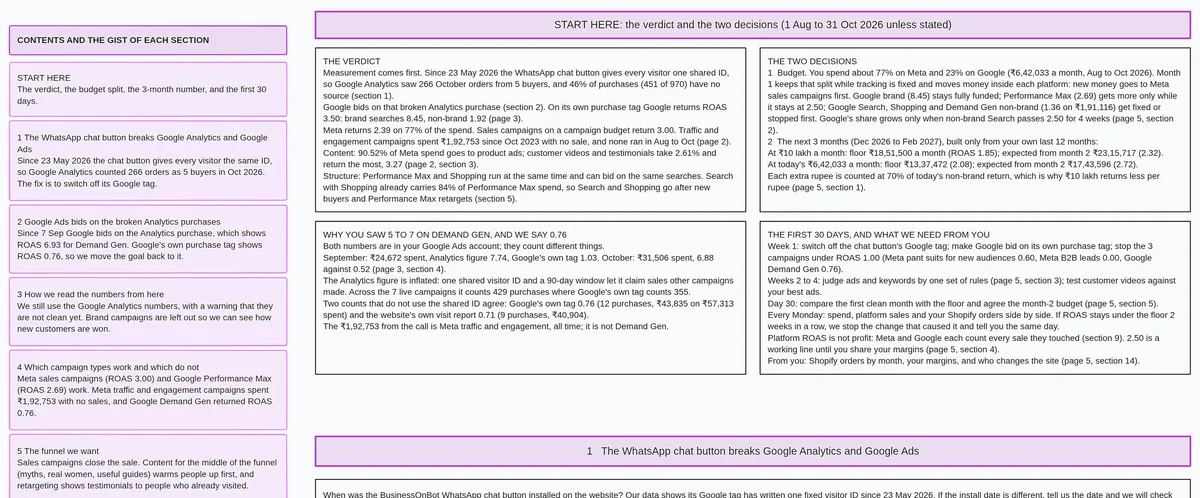
Run your free Google Ads audit with a 5-page report.
Google Ads Optimization Score
The Google Ads optimization score is built into Google Ads. It estimates how well your account is set to perform and runs from 0 to 100%. It carries no extra charge and involves no third party.
Price
Free. Part of Google Ads.
Strengths
- Shows at campaign, account and manager account level.
- Comes with recommendations; applying them raises the score.
- Covers Search, Display, Video Action, App, Performance Max, Demand Gen and Shopping campaigns.
Limits
- Shown for active campaigns only.
- Google says it is separate from Quality Score.
- Covers Google Ads only.
Best for
An advertiser already inside Google Ads who wants quick platform-level guidance without leaving the interface.
The Paid Tools: Optmyzr and Adalysis
Optmyzr and Adalysis are paid PPC management platforms. Each charges a monthly fee that rises with ad spend. Both offer trials before you pay.
Optmyzr
The Essentials plan starts at $299 a month on monthly billing, or $209 a month on annual billing, at the lowest ad-spend band (up to $25K a month). It includes keyword, search query and ad optimizations, account audits, performance reports, budget monitoring and a rule engine. Up to 25 accounts on Essentials. A trial is available with no credit card required. Best for teams managing multiple paid accounts who need automated optimizations and rules.
Adalysis
One plan, priced by monthly ad spend. Starts at $149 a month on monthly billing, or $126 a month on annual billing, at the lowest band (up to $50K monthly ad spend). Includes unlimited Google Ads and Microsoft Ads accounts and unlimited users. A 30-day free trial is available. Best for teams that want unlimited Google Ads and Microsoft Ads accounts and unlimited users under one plan priced by monthly ad spend.
What a Grade Cannot Tell You
A grade scores how the account is set up. Four questions need a deeper look: what sales sit behind the ads, how to split the budget with Meta, which campaigns to stop this week, and which Meta purchase values to trust.
After the grade: 6 questions to answer

1. What ROAS and sales can I expect next month?
   Where to find it: Ads Audit (Maitreya Labs) — page 5, the 3-month forecast.

2. Which ads kept running with no sales behind them?
   Where to find it: Ads Audit (Maitreya Labs) — page 1, "ads kept running without sales"
   (ads that spent more than 2 times the average cost per sale with no sale).

3. Which campaigns are below 1.00 ROAS and should stop in week 1?
   Where to find it: Ads Audit (Maitreya Labs) — page 1, the week-1 stop list.

4. How should I split the budget between Meta and Google next month?
   Where to find it: Ads Audit (Maitreya Labs) — page 1, month-by-month budget split.

5. How does my account score compare with similar advertisers?
   Where to find it: WordStream Google Ads Grader — the benchmark comparison.

6. Which campaigns have active optimization recommendations right now?
   Where to find it: Google Ads optimization score — the recommendations list
   inside Google Ads.
When the WordStream Grader Is the Right Pick
The WordStream grader is the right pick in several specific situations. Knowing both helps you choose before you spend time on setup.
Pick the WordStream grader when you:
- Want a score in about a minute, with no manual export or additional setup.
- Run only Google Ads and have no Meta campaigns to include.
- Want a benchmark against peer accounts right now.
- Prefer a single sign-in with no label step.
Ads Audit is the wrong choice when you:
- Have no Google Ads account. The audit cannot start without one.
- Want ongoing account management or automation.
- Want a score in about a minute and prefer minimal setup steps.
- Need Microsoft Ads covered. Adalysis includes Microsoft Ads accounts.
- Prefer not to grant read-only access to your Google Ads account.
If you run Meta ads and want to understand how the Meta side of the audit works, the Meta ads audit from your Ads Manager exports explains the process and what to export.
How We Compared
We read each vendor's own public pages on 19 November 2026 and recorded only what those pages say. Sources: the wordstream.com grader page, free tools page and audit page; Google Ads Help; optmyzr.com pricing; adalysis.com pricing.
We did not run the WordStream grader alongside Ads Audit. The grader needs a sign-in to a live Google Ads account, and we had no account connected to both tools on 19 November 2026. Everything about the other tools on this page comes from their own public pages, read on that date.
We make Ads Audit.
Questions About the WordStream Google Ads Grader
Common questions from advertisers who found the grader or are deciding which free tool to run first.
Is the WordStream Google Ads Grader free?
Yes. WordStream offers the Google Ads Grader at no charge. You sign in with your Google Ads credentials and grant one-time read-only access to your account.
Does it need access to my account?
Yes. You sign in with your Google Ads credentials and grant one-time read-only access. WordStream describes this process on the grader page.
Does it cover Facebook or Meta ads?
The WordStream Google Ads Grader covers Google Ads. WordStream offers a separate Facebook Ads Grader for Facebook ads.
Why do WordStream's pages give different numbers of graded areas?
The wordstream.com grader page says "10 key metrics", the free tools page says "nine key areas", and the audit page says "eight key areas". All three descriptions appear on the same site, as read on 19 November 2026. The audit page lists the eight areas by name.
Is there a free alternative that reads Meta and Google together?
Ads Audit by Maitreya Labs reads both Google Ads and Meta Ads and is free. Google Ads is required to start; Meta exports are optional and make the 3-month forecast possible.
Run the free Ads Audit to see the ROAS and sales behind your Google Ads account, the month-by-month budget split, and which campaigns to stop in week 1. Setup takes about 10 minutes of your time.